ARTIHIVE
byKHAV
8 VOICESdigital swarm
4 FM PAIRSmutual modulation
DRONE + POLYtwo performance modes
ARP + STEP10 patterns / 1–16 steps
HYPER LFOOR / AND logic
DUAL DELAYsmooth TIME changes
01 / SIGNAL
ARTIHIVE is a digital artifact inhabited by a swarm of eight signals. They interact and form a self-organizing system—like a hive or an ant colony.
8 VOICESDigital swarm
4 FM PAIRSMutual influence
1 SYSTEMSelf-organization
02 / INTERFACE
One instrument - twelve components
Every page keeps four direct controls and a live visual field. Select a page to inspect its role.
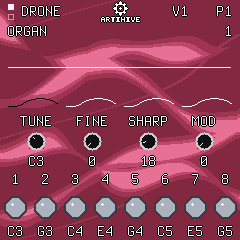
01 / 12
DRONE
Eight independently tuned voices, four FM pairs and a live output oscilloscope.
TUNEFINESHARPMOD
COLOURWAY
Select a firmware palette · ARP > 0.7 s on the instrument
03 / STEP
Build a sequence
STEP is a ten-pattern sequencer for notes, chords and rests. Every event remembers its recorded octave; patterns can run alone or as a looping chain.
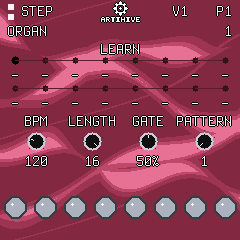
OPEN STEP
Press SEQ. PLAY starts or stops the sequence; stopping returns the position indicator to step one.
CHOOSE A PATTERN
Hold SEQ and press one of the first ten black keys. The display confirms pattern 1–10; every new bank starts empty.
RECORD EVENTS
While stopped, play a note or a chord to write it at the current step. In POLY, hold SEQ and press the rightmost black key to write REST.
EDIT AND PLAY
With transport stopped, hold SEQ and use OCT−/OCT+ to move through steps. BPM, LENGTH and GATE shape playback without changing recorded pitches.
SEQ + HOME switches STEP between DRONE and POLY. You may change the live POLY octave while STEP runs; the sequence keeps its recorded pitch.
Hold SEQ and press black pattern keys in the desired order. The new chain replaces the old one, loops continuously and follows the active pattern on-screen.
Hold SAVE while the STEP page is open to store the complete ten-pattern bank.
04 / SWARM
Hold REC
Release the SWARM
Hold REC for more than 0.7 seconds to enter SWARM. While the button remains held, parameters follow independent smooth trajectories of roughly ten seconds, and one discrete switch changes every second.
The interface becomes a full-screen cellular field that reacts to the output level. Release REC to return to the interface. Press SAVE + REC to undo the latest SWARM session.
REC > 0.7 sRELEASE = RETURNSAVE + REC = UNDO
LIVE CELLULAR FIELD
05 / EMULATOR
Play before installing
The browser emulator runs the unchanged ARTIHIVE firmware package with its screen, controls and sound.
06 / DEMO
Improvisational demonstration
07 / DOCUMENTATION
Read deeper
08 / INSTALL
Install with
extra care!
HARDWARE TESTING NOTICE
ARTIHIVE 2.0.4 has successfully started on physical FM-1 hardware. The local browser installer remains experimental, so The Firmware Hub is still the recommended public installation method.
09 / AFTERWORD
Thank you for becoming
part of the swarm!
— KHAV · 2026
Thank you to everyone who has installed ARTIHIVE, played it and allowed this digital artifact to exist beyond my own device.
ARTIHIVE is constantly changing. I continue to revise its sound, behavior and interface as I learn what the instrument can become. Version 2.0.4 is the current stable release, adding STEP, SWARM and a more precise sequencer transport while preserving the instrument’s eight-voice character.
Not every function has been fully tested yet. MIDI CC behavior is one of the areas that still needs broader hardware testing. I will keep working on ARTIHIVE, correcting it and expanding this instrument.
2.0.4CURRENT STABLE RELEASE
ONGOINGSOUND · BEHAVIOR · INTERFACE
TESTINGMIDI CC · HARDWARE